Capture your best moments.
Flare quietly keeps the last 30 seconds of your screen. When something great happens, press ⌥⇧3 and it's saved — then share it with a link.
 Recording · 30s ready
Works with every game and app on your Mac
Play. Clip. Share.
No recording to remember to start, no hour-long files to scrub through. Flare is always ready, and only keeps what you ask for.
Play
Flare sits in your menu bar and keeps the last 30 seconds of your screen and sound in memory. It's light: a few percent of one core.
Clip
Press ⌥⇧3 for the last 30 s, 1 for 10 s, 5 for 5 s — or hit Record for something longer.
Share
Trim it, crop it to 9:16, then upload in one click and copy a link that plays anywhere — or post it to the Community.
The moment already happened? You still have it.
Flare records in the background so you never miss the clutch, the glitch or the laugh. Save it after the fact with a shortcut you choose.
- Last 5 minutes, 30, 10 or 5 seconds, each on its own shortcut
- Record button for long videos — the menu bar F turns into a pause icon
- Native, 1440p, 1080p or 720p, at 30, 60 or 120 fps
- System sound and your microphone, mixed in one track
It knows what you played.
Every clip is named after the game or app on screen, with its real logo — even games that run through Java, like Minecraft. Filter your library by game in one click.
- Detects the app that filled the clip, not the one you clicked last
- Browsers show the site: “Safari · YouTube”
- The app's logo travels with the file, to the cloud and back
Trim it. Crop it. Done.
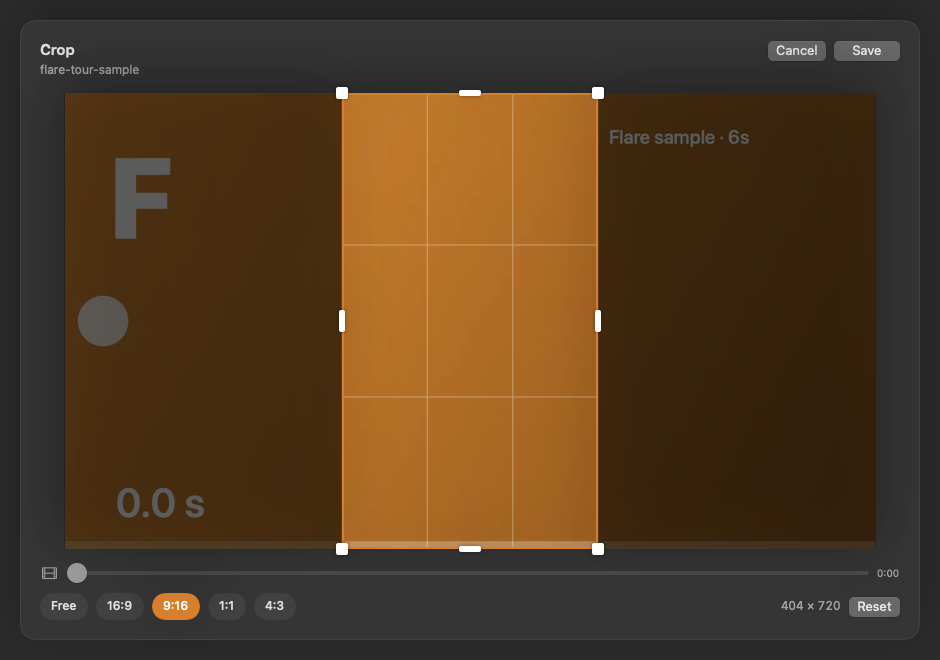
Cut the start and end with two handles, or crop to a vertical 9:16 for TikTok, Shorts and Reels. Saved in place, with the original kept in the Trash.
- Lossless trimming — no re-encoding, no waiting
- Crop presets: Free, 16:9, 9:16, 1:1, 4:3
- Smaller files with HEVC, when you want them
One link. Plays everywhere.
Upload a clip and get a link that plays in any browser and previews in Discord. Choose who sees it: everyone in the Community, only people with the link, or just you.
- Free account: email, or Continue with Steam
- Share Link copies the link the moment the upload is done
- Your avatar follows your Steam picture
Log in with Steam, Discord or email.
One free account for the app and the website: 50 MB of Flare Cloud, share links that play anywhere, a public profile, and your picture from the service you pick.
Fresh from the Community
The latest public clips from Flare players. Click one to watch it.
Light, private, native.
Barely there
Hardware encoding in power-saving mode. Flare uses a few percent of one core while you play.
Truly native
Built in Swift with ScreenCaptureKit. Universal app for Apple silicon and Intel Macs.
Your clips stay yours
Everything is saved on your Mac in Movies › Flare. Nothing leaves it unless you upload it.
Free
Flare is free to download and use, and every account gets 50 MB of Flare Cloud space.
Questions?
Is Flare free?
Yes. Flare is free to download and use, and a free account comes with 50 MB of Flare Cloud space for sharing clips.
Will it slow down my games?
Flare encodes with your Mac's video hardware in power-saving mode, at 30 fps and 1080p by default. On Apple silicon it typically uses a few percent of one core.
Where are my clips saved?
In Movies › Flare on your Mac, as regular MP4 files. They only go online if you upload them.
Which Macs are supported?
Any Mac with macOS 14 Sonoma or later — Apple silicon or Intel.
Your next great moment
is already on its way.
Download Flare, press a shortcut when it happens, and keep it forever.